Your TV service deserves a better player.

Bring the playlist your provider gave you. We bring the best guide in the business — on iPhone and iPad, with Apple TV next.

Coming first to iPhone — get notified

No spam, no account. Just one email when it's ready.
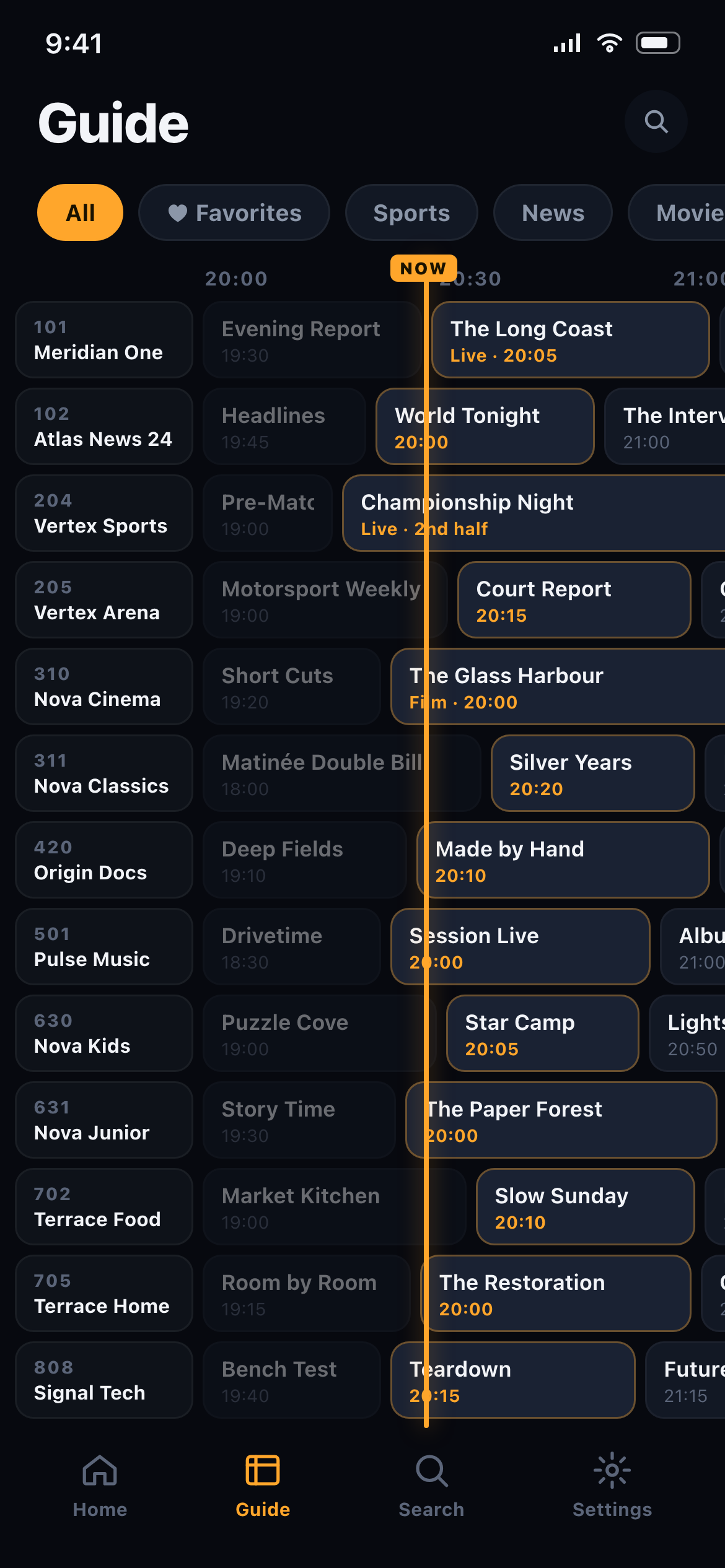
The Verso Player programme guide on iPhone, showing channel numbers, a programme grid and a live NOW line

Verso Player ships empty, on purpose. It contains no channels, no streams and no subscriptions. You sign in with the M3U playlist or Xtream Codes login from a TV service you already pay for — Verso is the player, your provider is the content.

The player

Everything the apps your provider hands out get wrong.

Built natively for Apple platforms — not a port, not a template app.

Setup that just works

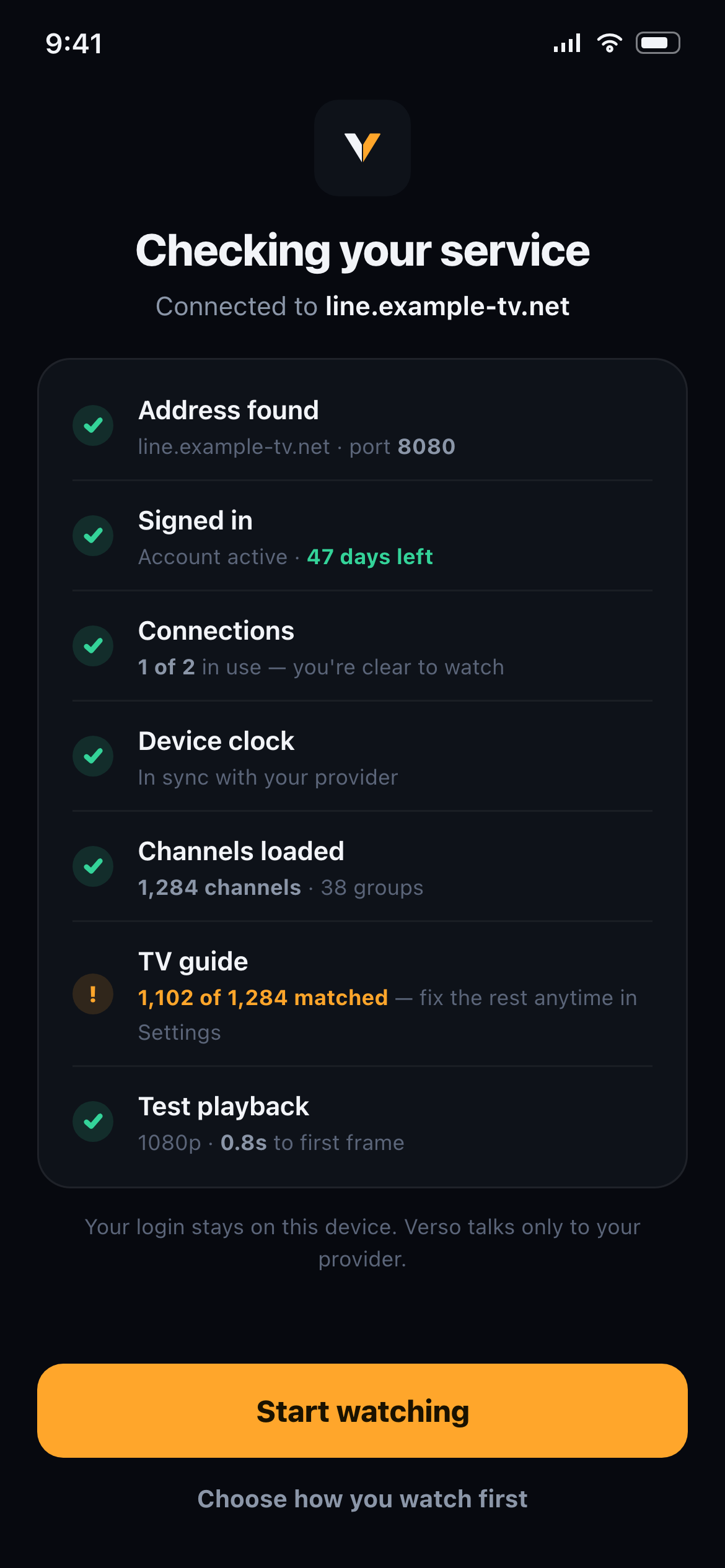
Paste whatever your provider sent you — a link, a login, anything. Verso works out the rest, and if something's wrong it tells you exactly what, in plain English. No more “failed to authorize.”

A guide that feels like broadcast

A fast, fluid programme guide with a live NOW line, day markers and search across channels and shows — smooth with thousands of channels and days of listings.

Instant channel change

Channel surfing the way it should feel. Verso keeps your next channels warm so zapping is immediate, with automatic failover when a stream has a bad night.

Make it yours

Compose your own player: choose your home screen, guide density, controls and gestures — or pick one of five presets and be done in three questions. Every screen has a reset.

Sync without accounts

Favorites, layout and history sync privately through iCloud. There is no Verso account, no password, and nothing to lose — reinstall and everything comes back.

Never lose your setup

Your favorites and custom channel numbers survive app updates, new devices — even your provider changing playlist links. Export a backup any time.

A first look

Designed like it belongs on your phone.

Verso Player setup screen running through a visible checklist: address found, signed in, connections, device clock, channels loaded, TV guide matched, test playback
Setup that shows its work. Every check visible, every problem explained in plain English.
Verso Player programme guide with channel numbers, programme grid and a live NOW line
The guide, done right. Fast, dense when you want it, with a live NOW line.
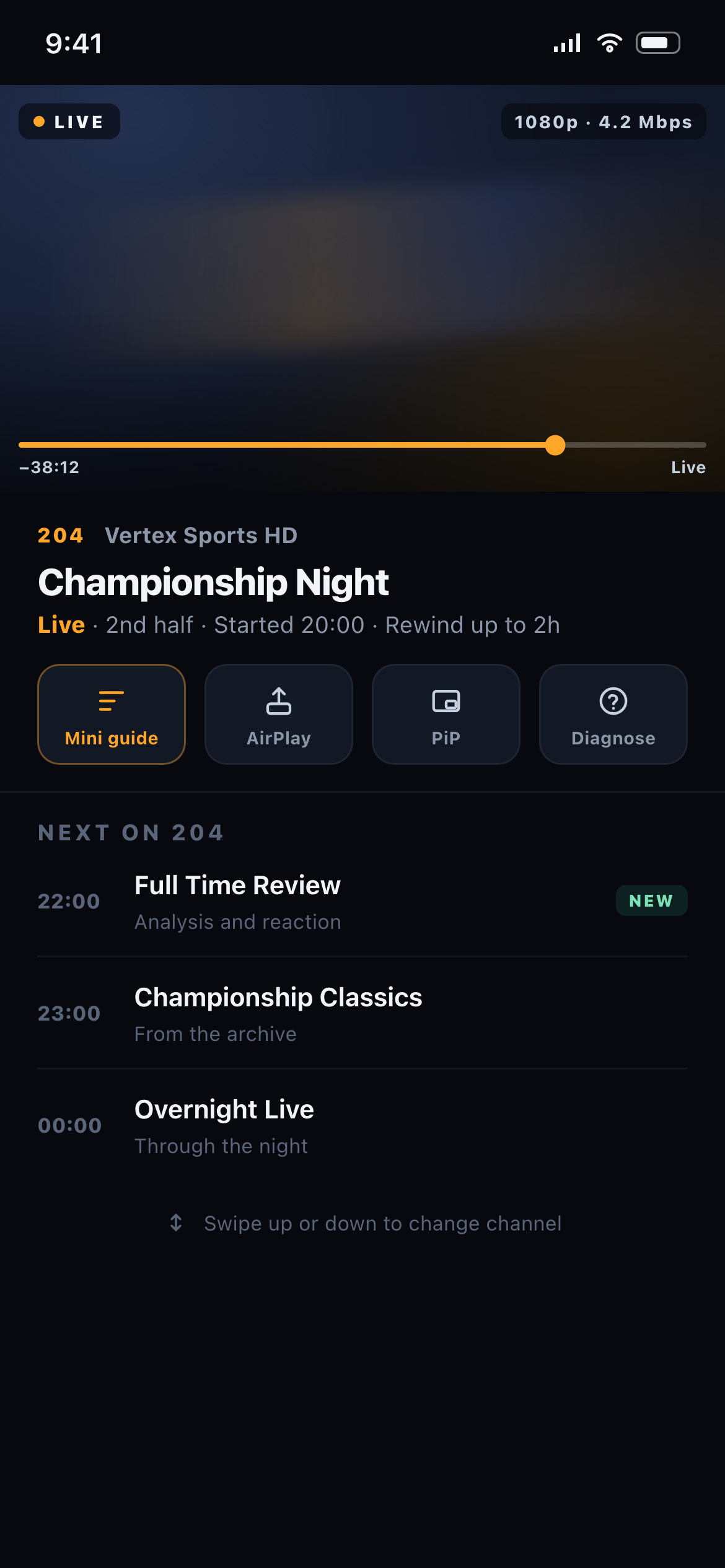
Verso Player playback screen with live rewind bar, channel info, mini guide and AirPlay, PiP and Diagnose controls
A player that respects live TV. Rewind, AirPlay, PiP — and a Diagnose button when a stream misbehaves.

Design previews from the app in development. Channel names shown are fictional — Verso ships with no content.

Verso Platform

Resellers: your brand, our player, live in minutes.

  • One activation code skins the app with your logo, colour and name — and pre-fills your portal so customers never type a URL.
  • No custom builds, no app review wait. Your customers install one trusted App Store app and enter your code.
  • A web console to manage branding, mint codes and see activations.

Partnership enquiries: partners@versoplayer.com

Questions

The honest answers.

Does Verso Player include TV channels or content?

No. Verso Player ships completely empty. It's a media player for services you already subscribe to — you sign in with the playlist or credentials your own provider gave you. Verso does not sell, include, or endorse any television content or subscriptions.

What formats does it support?

M3U / M3U8 extended playlists, the Xtream Codes API, and XMLTV guide data — including compressed playlists and guides, multiple playlists, and guides merged from more than one source.

Which devices?

iPhone and iPad first; Apple TV is next on the same purchase. Your setup syncs privately between your devices through iCloud.

What will it cost?

The core player and guide are free, with no ads — genuinely usable, not a demo. A premium unlock adds multiple playlists, sync, and deeper customisation, as either a subscription or a one-time lifetime purchase.

I'm a reseller — can I put my brand on it?

Yes — that's Verso Platform. Your customers install the standard App Store app and enter your activation code; your logo, colour and portal appear, and you manage everything from a web console. Write to partners@versoplayer.com.